
Chroma key is removing a solid background color, usually green or blue, from video so the subject can be placed over something else. It is how performers, guides and artists become video holograms in AR: film on green, key it out, and place the cut-out video in the scene.
Also known as: green screen, blue screen, keying, chroma keying

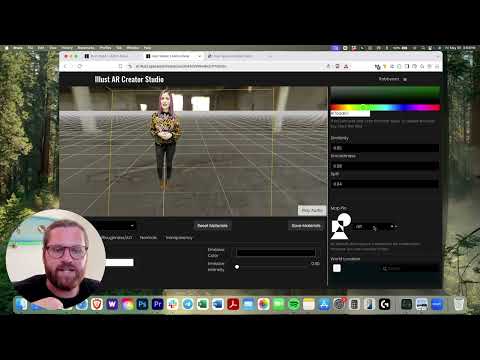
A green-screen clip with its background removed, standing in a 3D scene in illust AR Studio
How it works
Light the background evenly, keep the subject a few feet away to avoid green spill, avoid wearing green, then key in an editor or directly in the AR tool if it supports keying.
How it works in illust
Film on green and bring the clip into illust's AR Studio as a streaming video texture: the studio keys out the green background for you, as the hologram tutorial below shows. Upload .mp4 or .mov files up to 30MB, or stream longer clips.
Key facts
- illust's docs tutorial for launching a hologram at an event is built on a green-screen video brought into the studio (illust Studio docs: Launch a hologram).
- illust's streaming video texture streams large videos in instead of loading them all at once, and is how holograms come into a scene (illust Studio docs: Streaming Video Texture).
- illust accepts .mp4 and .mov video up to 30MB per file (illust AR Studio).
Watch
FAQ
Green or blue screen?
Green is the usual choice and is what illust's hologram tutorial uses. Whichever you pick, don't wear that color, because it keys out with the background.
Do I need a studio?
No. A smooth green backdrop, even light and a phone on a tripod are enough.