
An image target is a picture, such as a painting, poster, mural, label or print, that an AR experience recognizes and uses as its anchor. When the camera sees the image, digital content appears on or around it and moves with it. It is the technique behind most living paintings, AR posters and AR murals.
Also known as: image tracking, marker-based AR, AR marker, trigger image, image recognition AR, marker tracking, natural feature tracking (NFT)


Scanning the printed artwork opens its AR layer
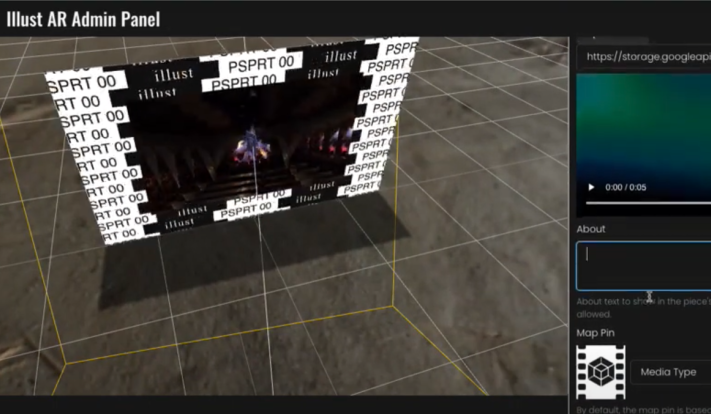
An image target set up in illust AR Studio
How it works
An image target is a pattern-recognition anchor, not the picture itself. When you upload it, computer vision maps its contrast, edges and distinctive feature points into a visual fingerprint. When a camera finds that fingerprint, the AR appears, pinned to the target's position, angle and scale, so it moves with the image. If the camera loses the target, the content can freeze, pause or reset until it finds it again.
What makes a good image target
Detail and contrast are your best friends.
Good targets have
- High contrast between light and dark areas
- Lots of unique detail
- Irregular shapes and textures
- Features spread evenly across the whole image
Avoid
- Flat colors
- Repeating patterns, such as brick or checkerboards
- Large areas of plain white or black
- Symmetrical or minimal designs
- Text-heavy posters and simple logos
Placing and testing a target
- Use a flat, matte, well-lit surface. Glare, wrinkles, low light and moving or flexible surfaces all break tracking.
- Bigger is steadier. The larger the physical target, the more stable the AR, which is why a large, matte, static mural makes an excellent target.
- View it head-on. Extreme angles reduce recognition; too close shows too few features and too far gives too little detail.
- Rule of thumb: if you can comfortably photograph it with your phone, AR can probably track it.
How it works in illust
In illust's AR Studio this is called Marker Tracking. Send illust a few photos of your target in different light and from different angles; the team tests the tracking and sends you a code. Keep the target image under 2MB. Then attach video, a 3D model (GLB with baked animations), images, audio, text or a streaming texture, and set its position, rotation and scale relative to the marker. Generate a Marker Tracking Preview QR code in the studio, test it on a print at home, then test it on site.
Explore AR StudioSee it in action: interactive AR displays →
Key facts
- Detailed, high-contrast, non-repetitive images track best; large flat color areas and glare track poorly.
- Image-only tracking can work in moving places such as a subway car, where world tracking struggles (Apple ARKit documentation).
Watch

FAQ
What makes a good image target?
Lots of detail and contrast, few repeating patterns, a matte finish and good light. Simple logos, gradients and large solid areas are hard to recognize.
Does an image target have to be printed?
No. It can be painted, printed or shown on another screen, as long as it closely matches the uploaded image.
Why does my image target lose tracking?
Usually glare, low light, a wrinkled or moving surface, or a viewing angle that is too steep, too close or too far. Hold the phone head-on at about the distance you would take a photo from. While the target is lost, the AR may freeze, pause or reset.
What are image targets used for?
Connected packaging, scavenger hunts, storefront murals and window displays, print ads and catalogs that bring a product into the room, books and other print, billboards, murals and merchandise.